
I Tested 4 AI Video Models on 3 Products (Real Costs)
21 same-image renders across Wan 3.0, MiniMax H3, Kling 3.0, and Seedance 2.5: exact prompts, full videos, real costs, and two clear winners for product videos.
 Celeste Deng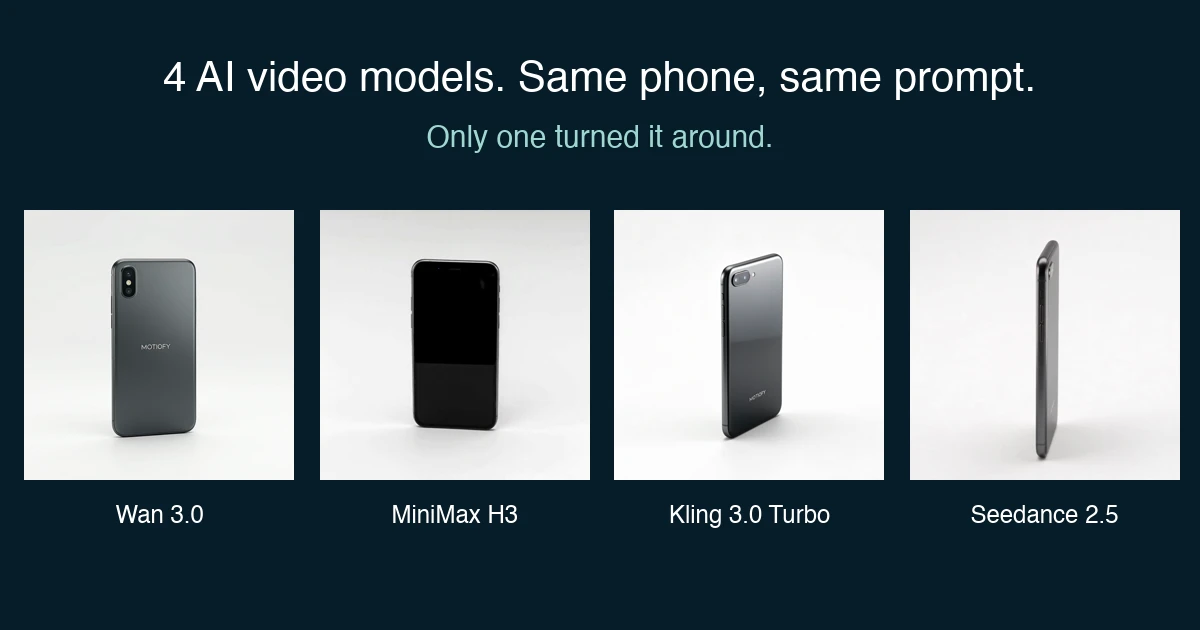
The Quick Answer: Two Clear Winners
If you are generating video loops for e-commerce product pages, you do not need to test every new model. Two models take the entire workflow:
- For seamless 360° product loops (orbit): Use MiniMax H3. It was the only model that executed a genuine 360° orbit across all three test products, and the only one capable of turning an asymmetric smartphone around to reveal a plausible front screen (see the single-image boundary in Failure #2). At 18 credits per second (768P), it costs roughly half of the quality fallback.
- For macro texture close-ups (push-in): Use Wan 3.0. It was the only model that actually drove the camera forward on all three products without distorting the geometry. It is also the cheapest model in the test at 16 credits per second (480P)—a complete 7-second clip costs just 112 credits.
- The quality fallback: If your product is fully symmetric (like a lipstick tube or snack bag) and you require maximum restraint with zero hallucinated text on the back, Seedance 2.5 is the safest fallback—though it comes at twice H3’s price.
- The model to bench as a default: Kling 3.0 Turbo. While it delivered cinematic lighting on one shot, it introduced noticeable morphing artifacts on another and proved too inconsistent across the full matrix to serve as a reliable production default. It survives only as an optional push-in fallback—if you audit every clip.
Disclosure up front: I run Motiofy, which sells access to all four models below—I have no stake in which one wins. Details in the next section.
These findings are based on 21 head-to-head renders across 4 models, 3 product categories, and 2 foundational e-commerce camera moves—using the exact same source images and prompts, with zero cherry-picking. One honest limit: each cell is a single generation with one prompt wording and fixed settings, so the results describe default behavior under these exact prompts, not a model's ceiling. One isolated anomaly (Kling's frozen lipstick orbit) could be single-sample luck; the cross-product patterns—3/3 or 0/3—are the signal worth trusting.
Why I Ran This Test (and Why Roundups Don't Help)
We are currently rebuilding Motiofy’s homepage around automated workflow cards tailored for e-commerce sellers—features like "Turn a product photo into an Amazon listing loop" or "Generate a macro packaging detail shot."
Shipping these workflows responsibly requires choosing honest, reliable default models. I refused to select our defaults based on Discord buzz or vendor cherry-picks.
If you sell physical products online, you face a frustrating dilemma: too many models, too much vendor marketing, and almost nobody testing them under controlled conditions:
- Same source image
- Identical prompt text
- Real physical products with text labels
- Showing every failure unedited
Full Disclosure: I run Motiofy (motiofy.ai), and our platform provides access to all four models evaluated here. I have no incentive to steer you toward one over another. Credit rates below are Motiofy’s standard per-second rates; all video renders were generated between August 24 and August 25, 2026.
Test Design: Three Products, Two Shots, Four Models
1. The Products
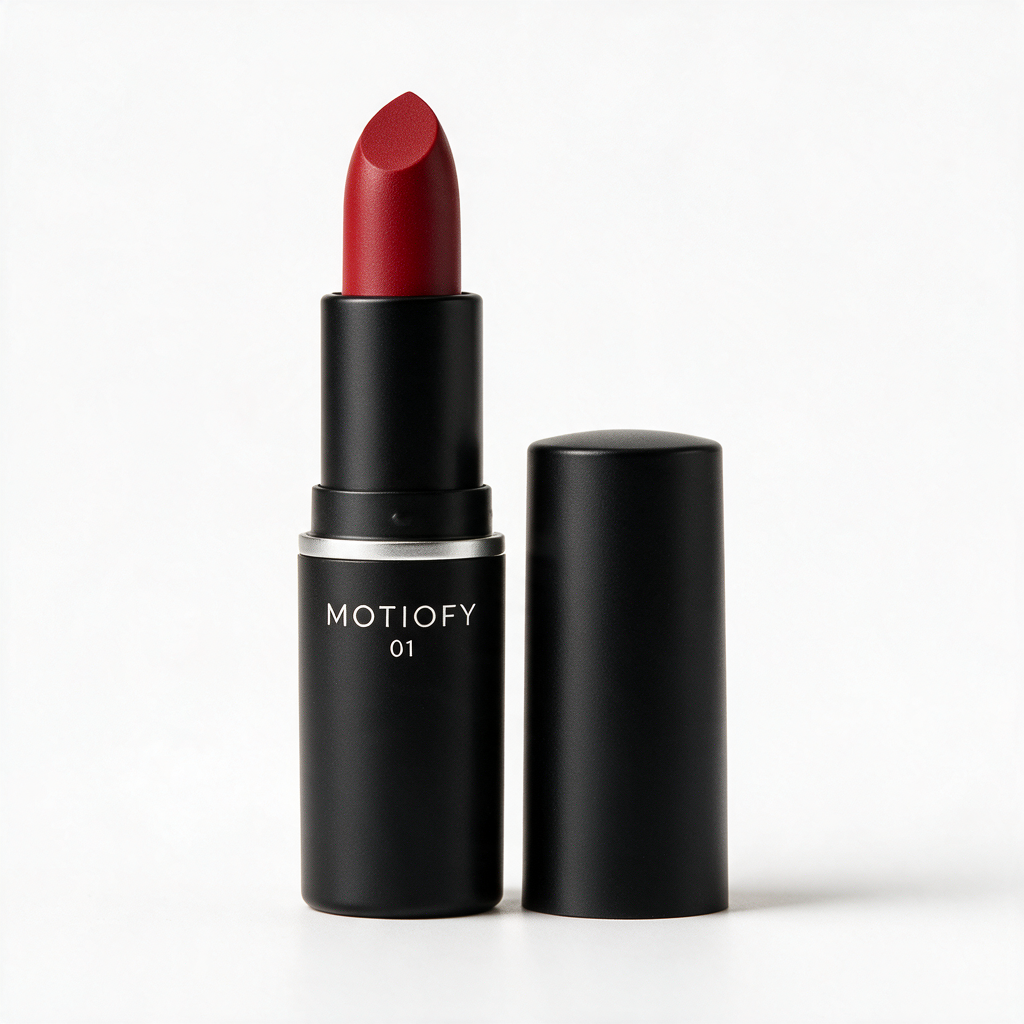
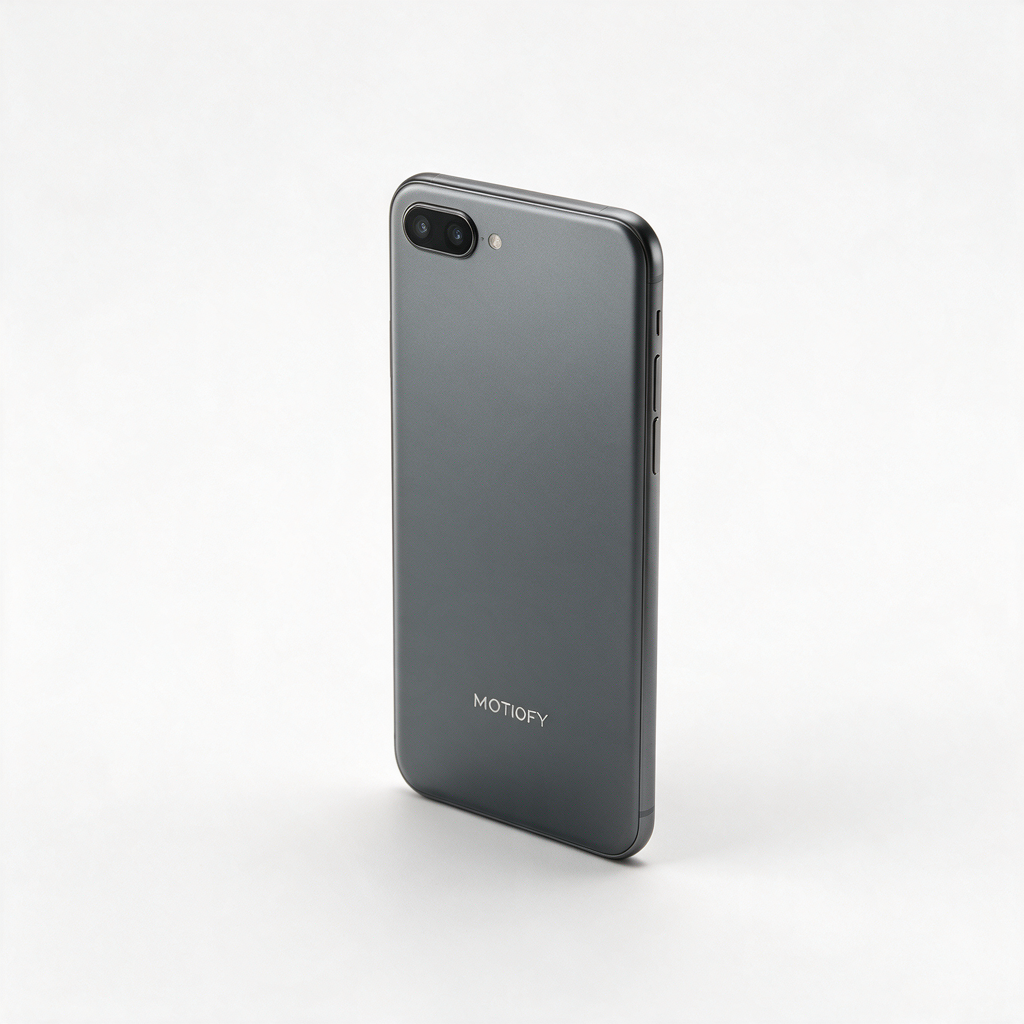
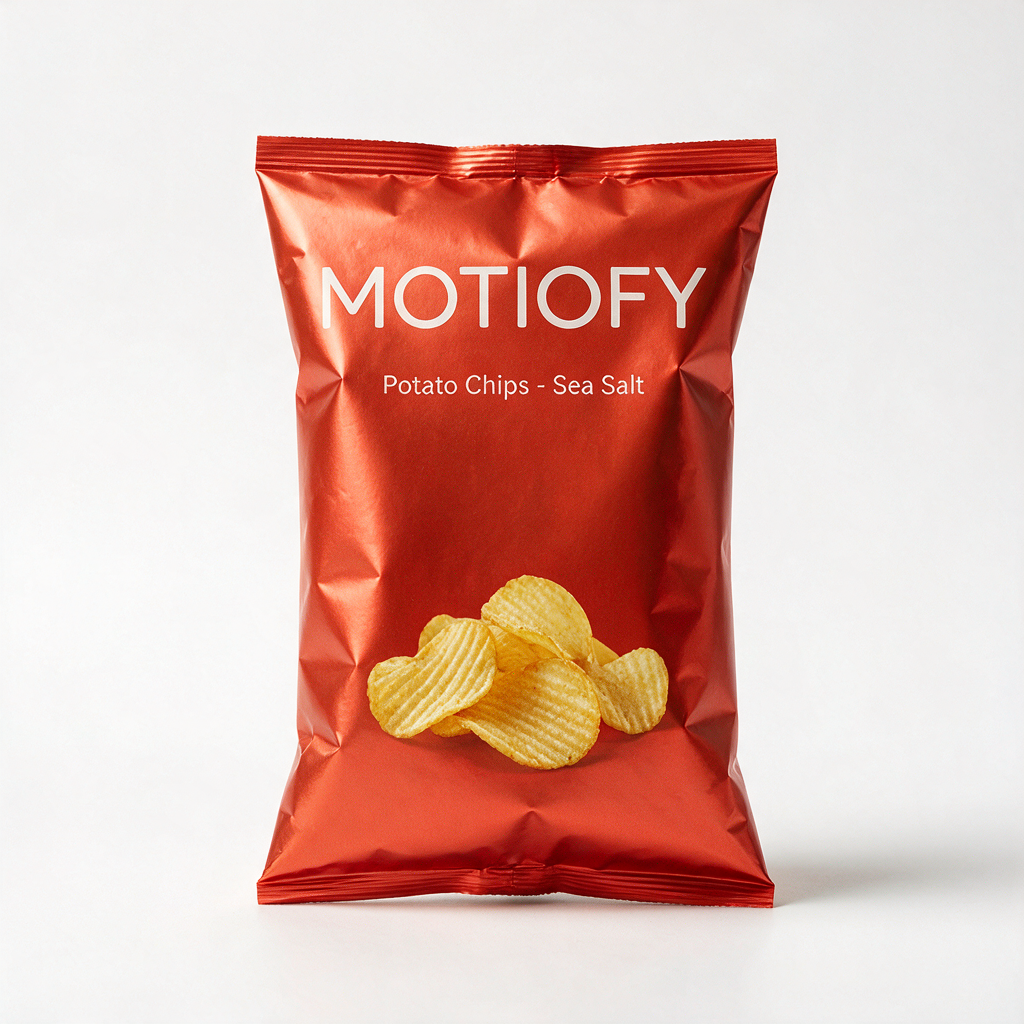
To guarantee strict reproducibility without trademark complications, I generated three fictional MOTIOFY-branded studio shots using Seedream 5 Pro: a lipstick, a smartphone, and a bag of chips. This allowed me to observe exactly how each model handles pristine brand typography it has never encountered during training. All source files are 1024×1024 clean white-background studio photographs.
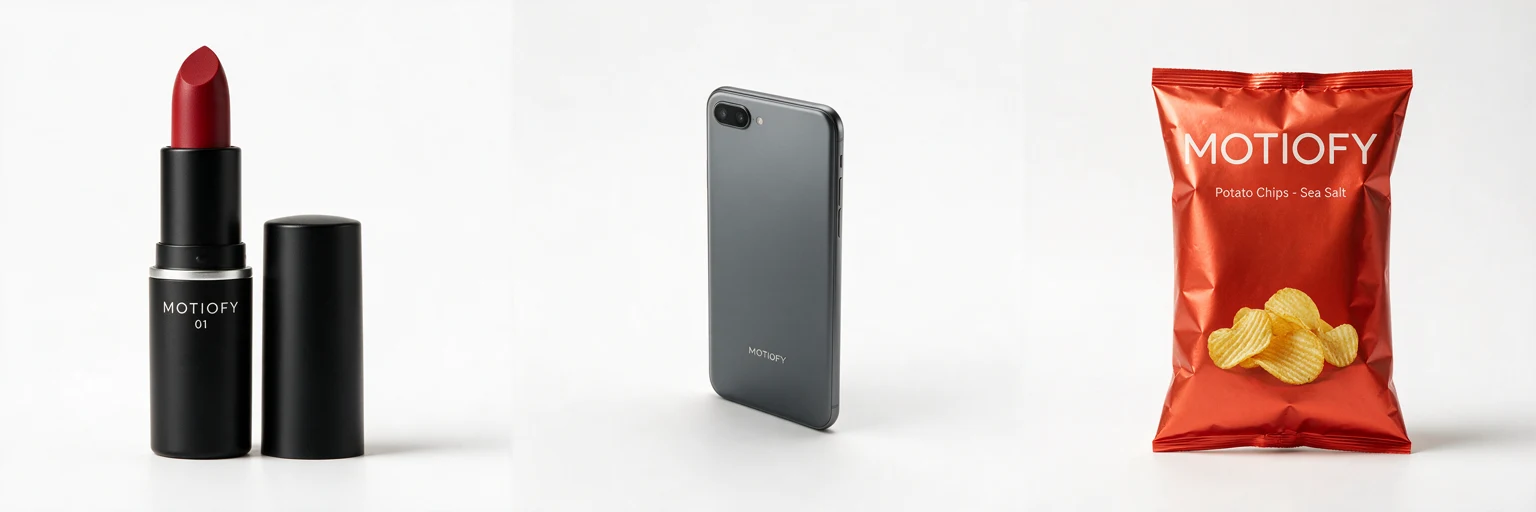
Download the exact source files if you want to rerun this benchmark: lipstick, smartphone, chips bag — 1024×1024 PNG, free to reuse.
2. The Camera Moves
I evaluated the two most critical video assets needed for product detail pages (PDPs):
- 360° Orbit (8 seconds): A slow, steady circular revolution with identical first and last frames, designed to loop indefinitely on a product page.
- Macro Push-In (7 seconds): A close-up camera move with shallow depth of field, slowly pressing into the product's surface texture.
3. Models, Tiers, and Credit Costs
To reflect real-world unit economics, I selected the lowest usable commercial tier for each model (enabling first/last frame controls where supported):
| Model | Tier | Credits / Sec | 8s Orbit Clip | 7s Push-In Clip |
|---|---|---|---|---|
| Wan 3.0 | 480P | 16 | 128 | 112 |
| MiniMax H3 | 768P | 18 | 144 | 126 |
| Kling 3.0 Turbo | 720p | 30 | 240 | 210 |
| Seedance 2.5 | 480P | 35 | 280 | Not run |
Tiers differ because each reflects that model's cheapest usable option; every verdict below is about camera execution and product fidelity, not pixel sharpness. Credits are Motiofy's currency—see pack rates on the Pricing page.
4. Benchmark Rules & Cost Discipline
- Single Attempt Only: Every cell in the matrix represents a first-take generation. Rerolls represent the hidden financial drain in production AI pipelines; hiding them defeats the purpose of benchmarking.
- Evaluation Criteria: Camera path fidelity, rigid body stability, label text preservation, absence of self-cuts, and immediate e-commerce utility.
- Budget Honesty: I ran Wan 3.0's full matrix first on the cheapest tier (6 clips). MiniMax H3 and Kling 3.0 Turbo ran the complete matrix. Seedance 2.5 was reserved exclusively for the orbit comparison; at roughly double H3’s credit rate, it was economically disqualified from becoming our budget default, so I omitted its push-in runs. 21 clips in total.
5. Why One Image, on Purpose
A fair objection: few careful sellers would request a 360° orbit from a lone front photo—uploading a front and a back shot is the sensible workflow, and we recommend exactly that in Failure #2. We tested the hard way for two reasons. First, a single image is the strictest control condition: same lone image in, and you see each model's generative prior—who can actually imagine the unseen side, and who quietly cheats. Give every model two angles and almost all of them look competent; the mirror dodge only becomes visible here. Second, a single image is what a large share of real users will actually do. People upload their one best photo and click generate. Defaults have to survive the lazy case, not the careful one.
The Exact Prompts (Copy and Paste)
Both prompts utilize a disciplined prompt structure: Asset anchor → explicit camera motion → rigid subject constraints → subtle environmental dynamics → lighting continuity → loop landing beat → negative restrictions.
The loop locking syntax (identical start and end frames) borrows a Kling community technique (checked August 2026).
Orbit Prompt (orbit.txt)
Using the uploaded product image as the exact visual reference, with identical start and end frames.
Camera: full 360-degree slow-motion orbit around the product. Smooth, steady circular motion at constant speed. No zoom in or out.
Subject motion: the product remains rigid, perfectly centered and upright at all times.
Lighting: preserve the source lighting; a soft highlight sweep may move across the product surface.
Final beat: the product returns to the exact starting angle for a seamless loop.
Restrictions: no product morphing, no logo distortion, no shape changes, no extra objects, no flicker.
Push-In Prompt (pushin.txt)
Using the uploaded product image as the exact visual reference, create a 7-second product clip.
Preserve the exact product shape, color, label placement, packaging and camera angle.
Camera: macro close-up with shallow depth of field, slow push-in toward the product texture.
Subject motion: the product remains rigid and accurate.
Scene motion: a soft highlight sweep across the product surface, subtle background parallax.
Lighting: preserve the source lighting and add a premium studio reflection.
Final beat: product centered in a clean hero frame.
Restrictions: no text, no logo distortion, no extra products, no shape changes, no flicker.
(Note: If you run these prompts on other models, pay close attention to the "rigid" instruction—see Failure #3 below).
Orbit Results: Only One Model Turned the Phone Around
The smartphone is the ultimate litmus test for 3D spatial consistency. A phone is inherently asymmetric: the back housing features a dual-camera bump, while the front is a flat glass display.
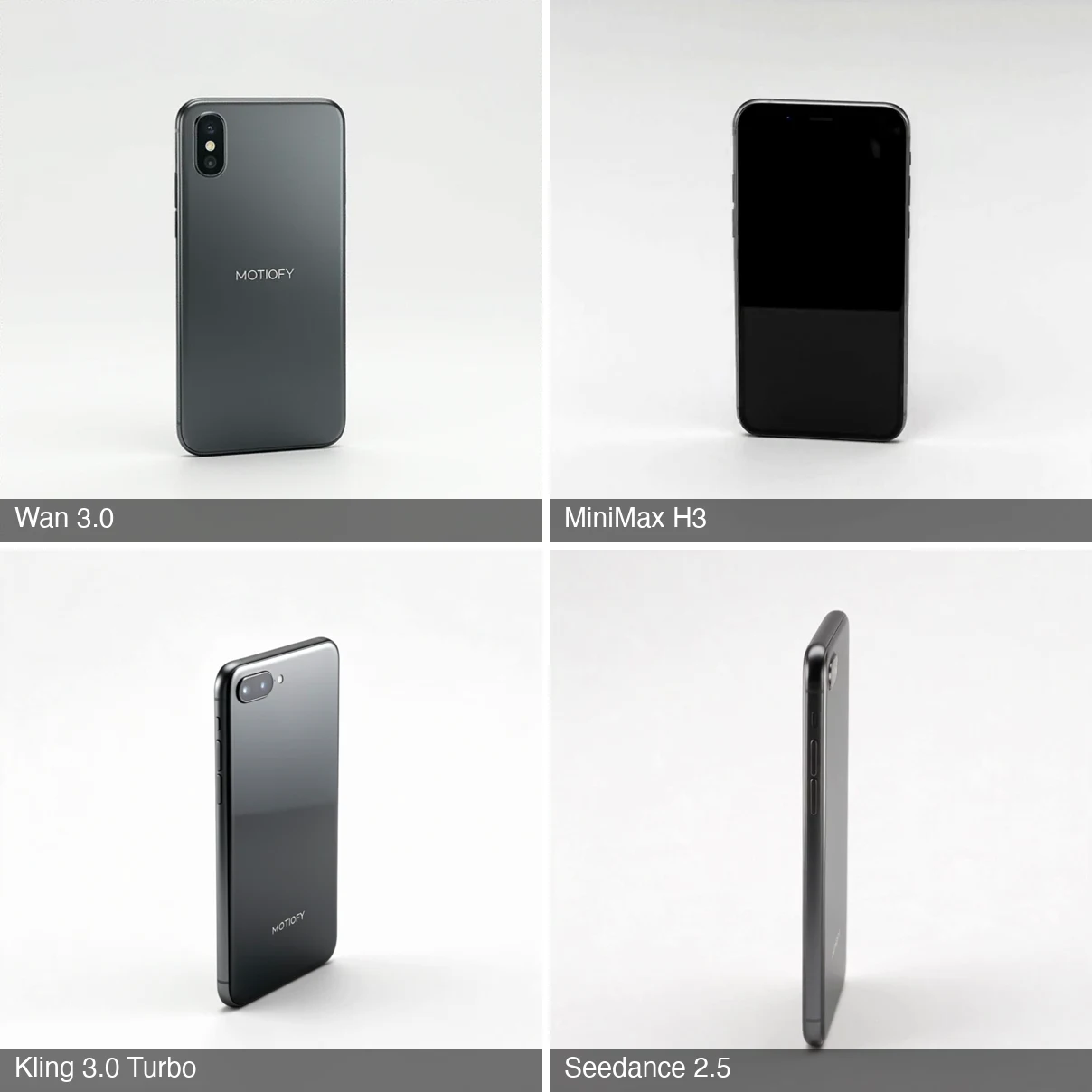
A genuine 360° camera orbit must hallucinate the front screen at the 180° midpoint. Here is how all four models handled that midpoint frame:
Detailed Orbit Observations
- MiniMax H3 (Winner): H3 synthesized a completely plausible front phone face: a dark bezel, an earpiece speaker slit, and side button profiles. While fabricated, this is exactly what a true 360° physical orbit requires. Across the lipstick, phone, and chip bag, H3 executed seamless, full-circle loops that returned cleanly to the start frame. (Minor flaw: during rapid rotation around the 1.0–1.5s mark, fine label typography softened briefly before stabilizing).
- Wan 3.0, Kling 3.0 Turbo, and Seedance 2.5 (The Mirror Dodge): All three models cheated the rotation. They rotated to the side profile, then mirrored the back panel on the other side. The screen was never rendered. Because the prompt specified "identical start and end frames" without explicitly forbidding mirrored rotation, the models found a mathematically valid shortcut that ruins the listing video.
- Kling 3.0 Turbo (Lipstick Failure): Kling’s lipstick orbit remained almost completely stationary; the cosmetic tube barely shifted angle in place, failing the rotational requirement.
Side-by-Side Video Evidence
Watch all four phone orbits compared directly:
Wan 3.0 · Phone orbit
The mirror dodge: back, side edge, then a mirrored back again. The screen never appears.
MiniMax H3 · Phone orbit
True 360 with an invented but plausible front: black screen, earpiece slit, side button.
Kling 3.0 Turbo · Phone orbit
Same mirror dodge — no front face ever appears.
Seedance 2.5 · Phone orbit
Mirrored back as well — flipping the product is not in its toolkit.
And MiniMax H3's clean loops on the symmetric items:
MiniMax H3 · Lipstick orbit
True 360 on a symmetric product, with a clean loop return to the start frame.
MiniMax H3 · Chips orbit
True 360 — but read the invented back label ("Mashinpshin").
Orbit Verdict: MiniMax H3 is the undisputed default. It is the only model that delivered a genuine 360° turnaround across every item, runs on the highest-resolution tier in the test (768P), and costs roughly half of Seedance 2.5.
Push-In Results: Only One Model Actually Pushed In
A macro push-in tests prompt obedience versus semantic comprehension. "Slow push-in toward the product texture" should result in clear forward camera translation. The models produced drastically divergent outcomes:
- Wan 3.0 (3/3 Flawless Executions): Wan adhered strictly to camera kinematics. It pushed into the lipstick bullet bevel, zoomed into the phone's dual-camera glass, and drove directly into the chip bag texture without warping or self-cutting. It interprets directional camera commands better than any model tested.
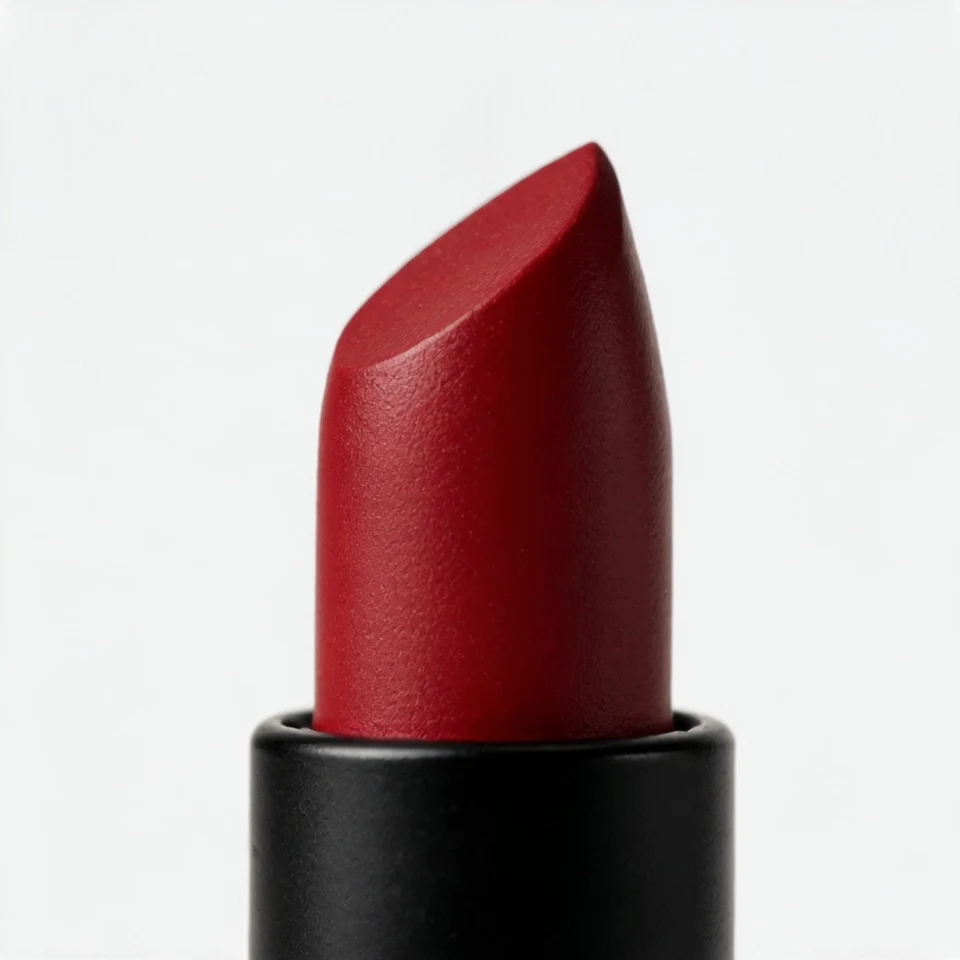
- Kling 3.0 Turbo (Cinematic but Unstable): Kling produced gorgeous micro-contrast and lighting, but struggled with structural stability. On the lipstick push-in, right at the 4.0-second mark, the lipstick bullet visibly elongates and emits an artificial red glare before settling (note: the cap moving out of frame later is proper camera movement, not an artifact). On the phone push-in, the back panel progressively underexposes after 4s until it turns nearly pitch black.
- MiniMax H3 (3/3 Motion Failures): H3 essentially refused to translate the camera. The opening and closing frames show virtually identical framing (less than 2–3% perceptible scale change). It appeared to prioritize the "rigid" constraint over the camera directive.
- Seedance 2.5: Not run (omitted to preserve test budget).
Side-by-Side Lipstick Push-Ins
Wan 3.0 · Lipstick push-in
Textbook execution: lands on the bullet texture with no warping.
MiniMax H3 · Lipstick push-in
Nearly static — "rigid" read as "camera, do not move".
Kling 3.0 Turbo · Lipstick push-in
Best texture of the test — until the ~4.0s transition artifact.
Kling's 4-second morphing artifact frozen at the exact frame:
Push-In Verdict: Wan 3.0 is the clear default. It executed the camera path with complete physical accuracy across all three products at the lowest price point in the benchmark (112 credits per clip).
Three Failures That Changed How I Prompt
The most actionable insights from a benchmark come directly from what fails:
1. Brand Names Required Three Iterations to Anchor
Generating the source assets with "MOTIOFY" cleanly displayed on the front required trial and error. Initial image prompts rendered "MOTIOIFY". When I tried hyphenating letter-by-letter, the generator literally printed the hyphens.
- The Fix: Enclose the exact brand name in quotation marks accompanied by strict exclusion parameters ("no hyphens, no extra letters"). This eliminated typographic defects across all 21 downstream video clips.
2. The Danger of the Single-Image "Mirrored Orbit"
During my initial review pass, I almost marked the phone orbits from Wan, Kling, and Seedance as acceptable because the motion was smooth. A frame-by-frame audit caught the flaw: the screen never appears.
- New Operational Rule: Never attempt a single-image 360° orbit on an asymmetric product. If you must generate an orbit from a single image, use MiniMax H3 (accepting its hallucinated front interface), or provide multi-angle image conditioning.
- The natural next round: front + back conditioning on the same three products—whether a guided 180° beats H3's invented 360. I will update this article when it runs.
3. Over-Constraining Prompts Can Paralyze the Camera
MiniMax H3’s failure to execute the push-in was, it turns out, caused by the prompt itself: "the product remains rigid and accurate." To a cautious model, this can be interpreted as "do not change screen coordinates or perspective." The start and end frames below are nearly identical:
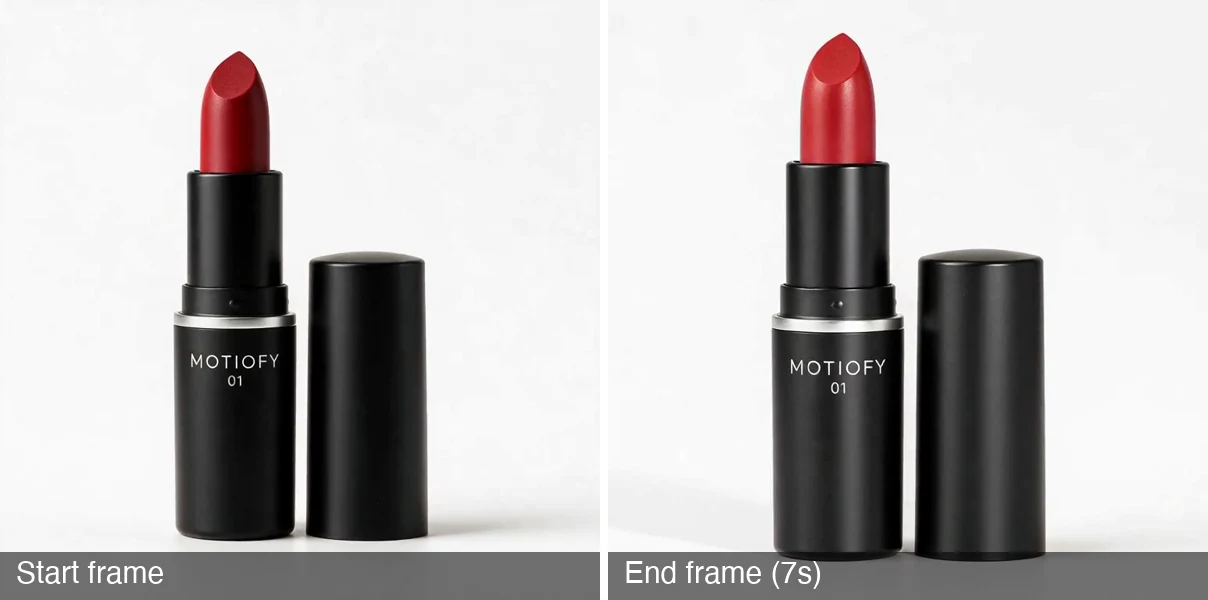
- The Fix: Rephrase camera directives with assertive language ("the camera slowly moves toward the product, ending on a macro detail") while isolating "rigid" strictly to packaging geometry and typography.
- Status: Confirmed—re-tested August 26. With the fixed prompt, the same model executed the push-in on all three products: full camera travel, labels intact, zero warping. The frozen v1 clips were the prompt's fault, not the model's.
MiniMax H3 · Lipstick push-in (fixed prompt)
Same model, v2 prompt: full camera travel to a bullet macro.
MiniMax H3 · Phone push-in (fixed prompt)
Pushes in toward the logo area; label intact, no warping.
MiniMax H3 · Chips push-in (fixed prompt)
Pushes to the bag texture; the label stays readable.
Back-Label Hallucination: The Restraint Ranking
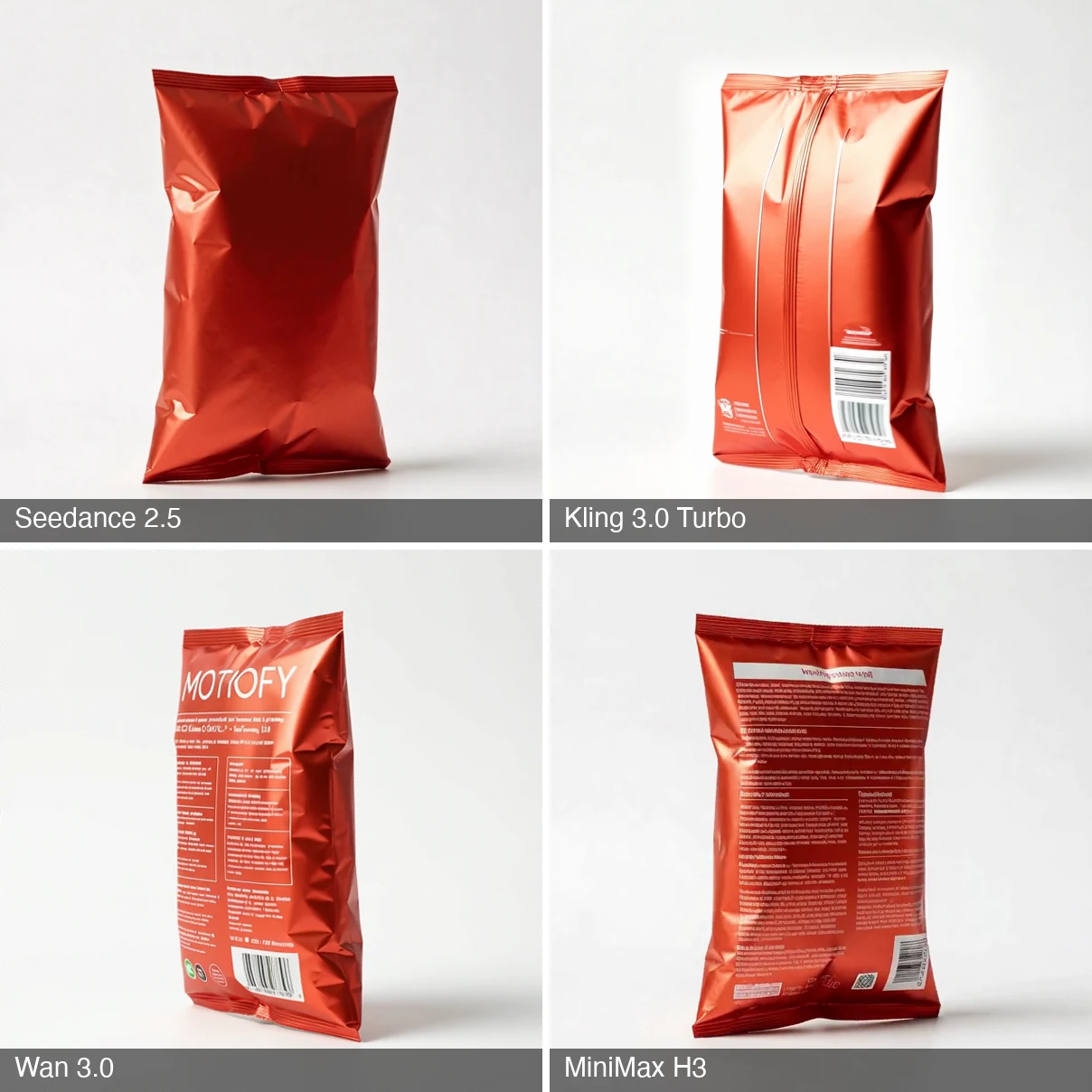
Every single-image 360° orbit must invent the rear packaging. Here is how the models ranked in creative restraint:
- Seedance 2.5 (Best): Rendered a clean, minimalist packaging seal with zero fabricated text.
- Kling 3.0 Turbo: Kept it to a seal strip and a barcode, with no fabricated brand text.
- Wan 3.0: Invented an entire nutritional facts table composed of illegible pseudo-glyphs.
- MiniMax H3: Hallucinated high-contrast text blocks, inventing the brand name "Mashinpshin".
The Decision Table
Based on these empirical results, here are the production defaults configured in Motiofy for automated listing video generation:
| Shot Type | Recommended Default | Quality Fallback | Credits / Sec | Total Clip Cost |
|---|---|---|---|---|
| Seamless Orbit Loop (8s) | MiniMax H3 (768P) | Seedance 2.5 (symmetric items; zero text hallucination) | 18 / 35 | 144 / 280 |
| Macro Push-In (7s) | Wan 3.0 (480P) | Kling 3.0 Turbo (cinematic look; audit for warping) | 16 / 30 | 112 / 210 |
Update (August 26): with the fixed prompt, MiniMax H3 now also executes push-ins at 768P (18 credits/sec)—a credible higher-resolution fallback alongside Kling. See Failure #3.
Core Rules for Your Workflow:
- Probe first on budget models: Test prompt composition and camera paths on Wan 3.0 (16 credits/sec) before committing budget to high-tier models.
- Asymmetric items require caution: For asymmetrical products (electronics, apparel with backs), either use H3 to generate a plausible front or stick to macro push-in shots.
- Zero-text tolerance: If your client or brand cannot tolerate hallucinated rear packaging text on an orbit, pay the premium for Seedance 2.5.
Try Both Shots on Your Own Products
Both prompts are above—copy one, upload a product photo with a neutral background, and run it on the recommended model:
- Run the 360° orbit workflow on MiniMax H3
- Run the macro push-in workflow on Wan 3.0
- Comparing generator platforms rather than raw models? Read our comprehensive 8-Tool Image-to-Video Generator Benchmark.
- Looking to produce full video commercials instead of listing loops? See How We Built a Luxury Product Ad from a Single Image, detailing the visual consistency framework.
- See what each model costs per second in credits on our Pricing page.